Cloud Services

Articles about cloud platforms, data storage, server capacity, and distributed services. This section shows why businesses and developers use the cloud, how cloud systems are structured, and what trade-offs come with their adoption.

Security analyst reviewing Google Workspace OAuth consent controls to block unauthorized app access
Cloud Services

Inside Google Workspace Breaches: Why a Few Controls Matter More Than a Long Checklist

Ask a security team what they need to protect Google Workspace and you’ll usually get a list: enforce two-step verification, tighten spam filters, set up DLP rules, lock down sharing, review third-party apps, configure DMARC, audit admin roles. All of it is defensible. None of it tells you where to start when you have three people covering security for a five-hundred-person company. That’s the real question fast-growing organizations face — not whether a control is good, but whether it’s worth doing first.
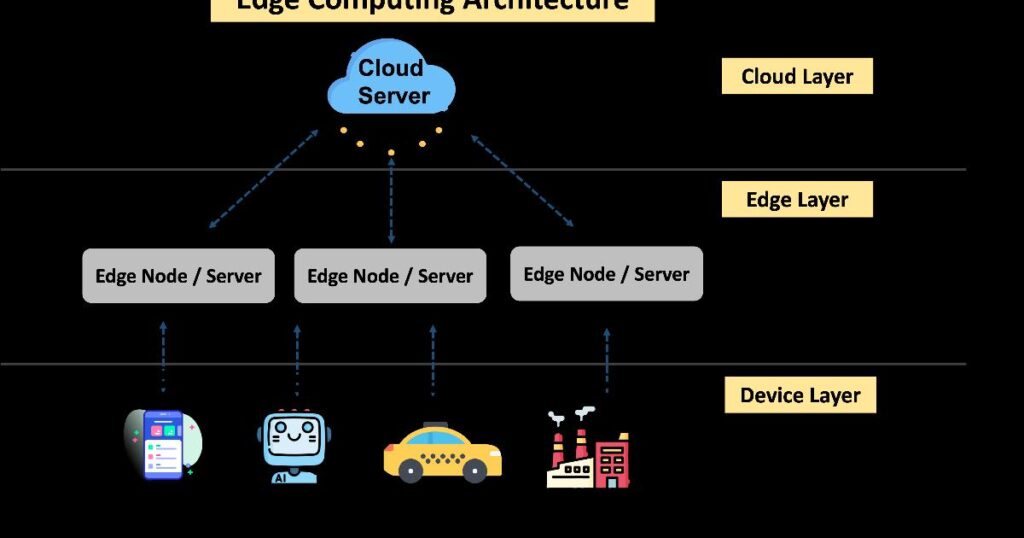

Diagram showing how EmDash serves structured JSON content to both human browsers and AI agents through different request paths at the network edge
Cloud Services

Why Cloudflare Rebuilt Its Own Blog on an AI-Native CMS — and What That Says About the Next Content Stack

When Cloudflare gave its corporate blog a fresh coat of paint this August — dark mode, a cleaner layout, a redesigned subscription box — most readers probably filed it under routine housekeeping. What they didn’t see was the infrastructure overhaul underneath: the blog had quietly moved onto EmDash, a brand-new, open-source content management system that Cloudflare built for itself and is now offering to everyone else. That migration is a more interesting story than a redesign, because it doubles as a real-world stress test of an idea that, until recently, existed mostly as a pitch deck: that content management systems need to be rebuilt from the ground up for a web where AI agents read, query, and even edit content alongside humans.

Service mapping diagram linking cloud services, ownership, and monitoring for faster cloud outage response
Cloud Services

What Broke, Who Owns It, and What Depends on It: The Hidden Map Behind Every Cloud Outage

When a checkout page freezes or a mobile banking app stalls, the first minutes of the incident rarely involve fixing anything. They involve figuring out what actually happened — which system failed, what else it touches, and which team can act on it. In a cloud environment built from dozens of interconnected services, that question alone can take longer to answer than the fix itself. This is the gap that service mapping is meant to close, and it explains why a growing number of operations teams treat it not as documentation but as infrastructure in its own right.

Google Photos save as photo shortcut for turning a paused video frame into a clean photo
Cloud Services

Google Photos Might Finally Make “Save Frame” Easy to Find

If you’ve ever paused a video to grab a perfect moment — a kid’s laugh, a sunset, a funny expression — chances are you did the obvious thing: you took a screenshot. It works, sort of. But it also captures the video player’s controls, a scrubbing bar, sometimes a status icon or two, and a slightly compressed version of the image you actually wanted. According to a new report, Google Photos may be about to make that entire workaround unnecessary.

A developer reviewing a GitHub outage dashboard on a laptop, illustrating a code hosting single point of failure
Cloud Services

When the Code Host Becomes the Single Point of Failure

For eighteen years, Mitchell Hashimoto opened GitHub every single day. He built his career practically inside it, joked as a 20-year-old that maybe the company would hire him if his open-source project was good enough, and treated the platform the way most of us treat electricity — a utility so reliable it disappeared into the background. Then, in April 2026, he announced he was moving his terminal emulator project, Ghostty, off GitHub entirely. “I want to ship software and it doesn’t want me to ship software,” he wrote. That sentence, more than any ideological complaint, is the real story here — and it’s a story about infrastructure, not politics.

A developer using a terminal command line on a laptop to access cloud services and automate tasks
Cloud Services

Why Techies Type Instead of Click: The Terminal as a Cloud-Era Shortcut

If you’ve ever watched someone check the weather, run a speed test, and convert a video file without ever opening a browser tab, you’ve seen a habit that looks like a magic trick but is really just a different way of asking the same question. The terminal — that plain text window many people associate with hackers in movies — has quietly become a practical front door to services that also happen to live on the web. Understanding why reveals something useful about how cloud-era tools are actually built.

Scroll to Top